Hellrunners - CSC8508 Team Project
Video link:Team Mark: 82% Individual Mark: 88%
Summary
CSC8508 was my team project module, to create a game in C++ in 8 weeks.
My main contributions to the project were
- Simple component system (created in my previous coursework, CSC8503)
- Physics broadphase rework using Sort & Sweep.
- Extra physics system features such as collision layers and physics materials.
- All animation code including a simple animation transition system. This includes networking animations such that the correct animation is shown for all clients.
- Integrating deferred rendering.
- Level select in the lobby menu, networked across clients. This involved interfacing with Joe’s LUA UI system.
- Level transitions including a countdown and waiting for all players to finish. This includes networking level loading such that the server and clients load the same levels and begin at the same time. Also involved reworking other’s code to function between levels.
- Made sure memory management was correct when transitioning levels.
- Editor tools in Unity such as visualisers for moving platforms. I also interfaced and extended my teammates level exporter tool.
- Gameplay changes involving moving platforms and tweaks to movement including coyote time.
- Networking various features such as player’s speed lines.
- Different textures per player so each player has a different look.
- And more minor changes and tweaks.
Since I was on the MComp course, for the first 4 weeks of the module, I also had a non-games module to study, meaning my contributions in the first half were lower than I would have liked.
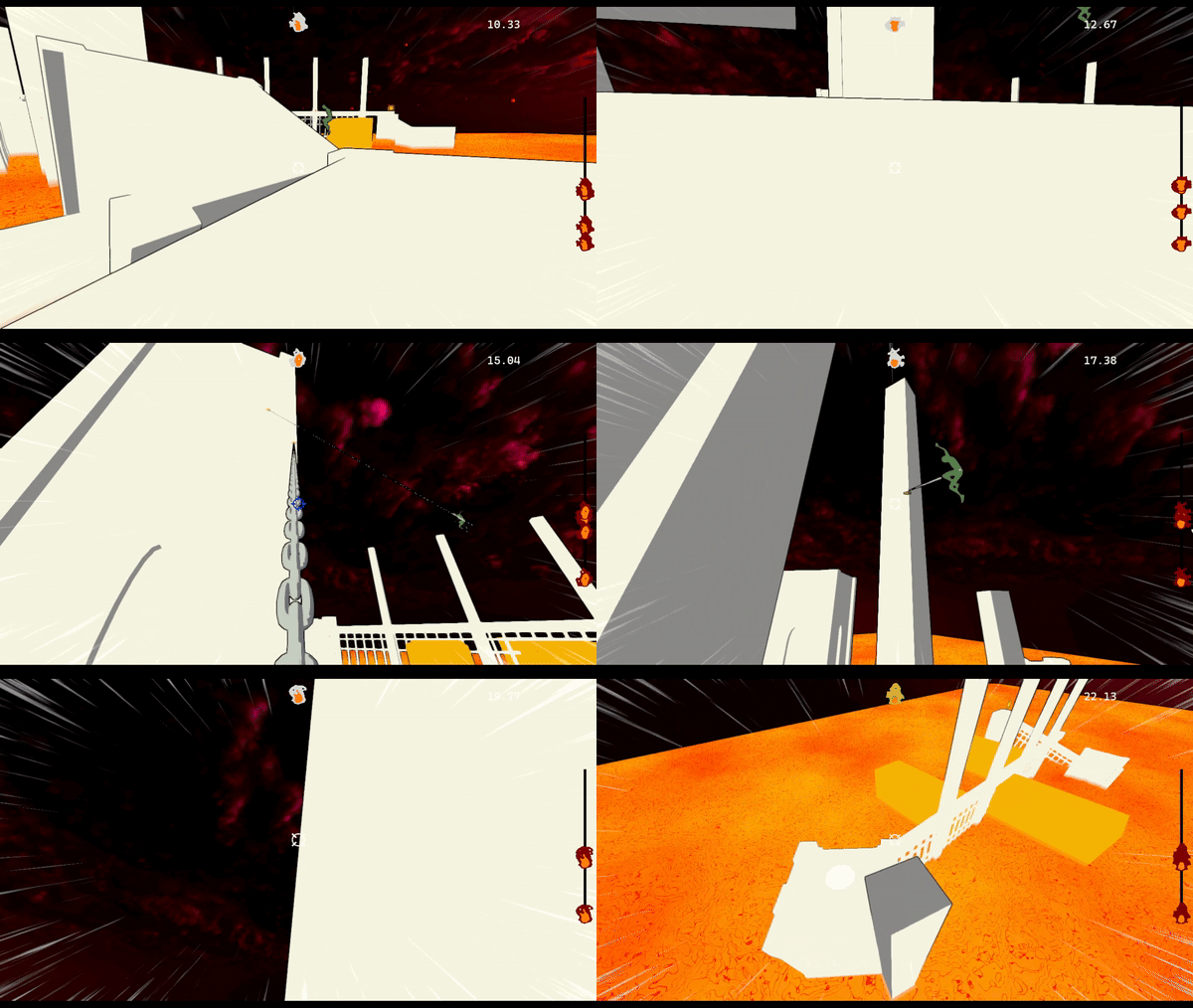
Multiple players playing the game.
Component System
The first task I did in the project was to research and implement a component system for the project. I had created a simple one in the last coursework, but another team member suggested moving to a full Entity Component System instead. We found a library called entt and looked into how to use it, but ultimately we settled on using my original system, as the base engine we were provided would require lots of code changes to work with entt and would not have been worth the time.
Deferred Rendering
For the implementation of the deferred rendering, I did not want to affect the look of the game too much, just allow for more lights in the scene. I therefore decided to take a hybrid approach to rendering: I left the standard forward lighting pass in the game for the directional light, and added extra passes afterwards for the deferred lights. By doing this, the game looked exactly the same as it did before (since the only light was the directional light), but it now supported adding extra deferred lights.
Since there were very few lights in most levels, the performance impact of this was minimal. Check my CSC8502 page for more information regarding my deferred rendering.
Physics changes
I made a few simple changes to the physics system to allow for more control: physics materials and collision layers. Collision layers were especially important as they had a large impact on speeding up the performance of the game: in the broad phase of the collision detection, we can ignore pairs of objects where their layers have been set to not collide.
I also made a major change to the physics: changing the broadphase algorithm from quadtrees to instead use Sort and Sweep. My main reasoning for this was that Sort and Sweep was more appropriate to our game: although it was a 3D game, the gameplay primarily takes place in one dimension, as the game involves running from one end of the level to the other. Because of the single dimensionality of the game world, quadtrees (which operate across multiple dimensions) were not necessary.
To implement sort and sweep, I added some new values to my game objects: a lower X bound and an upper X bound. The X dimension was chosen as this was the dimension our levels progressed in. I created a struct to represent a bound, and a vector to store two of these bounds for each object:
struct SortAndSweepBound {
    float* xPos;
    bool isUpper;
    GameObject* gameObject;

    bool operator<(SortAndSweepBound const& other) const {
        return *xPos < *(other.xPos);
    }
};

class PhysicsSystem{
    ...
    std::vector<SortAndSweepBound> sortAndSweepData;
    ...
}
Struct used in sort and sweep.
The reason I use a float pointer is so that a GameObject can update its upper and lower bounds as it moves in the world, and these changes can be reflected in the SortAndSweepBound without having to manually update it. We need a bool to determine if the bound is upper or lower, and we need a reference to the GameObject it is a bound for so we can then generate collision pairs when we run the “Sweep” phase. I override the < operator so the struct can easily be used with an insertion sort.
When coding the “Sort” portion of Sort & Sweep, the most common sorting algorithm used is insertion sort, as it is especially effected on groups of data that are almost sorted. Since not much changes from frame to frame in a game, we can guarantee that from one frame to the next, the bounds will almost be in the correct order.
void PhysicsSystem::SortAndSweep() {
    broadphaseCollisions.clear();

    SortAndSweepInsertionSort();
    std::set<GameObject*> currentValidObjects;
    for (int i = 0; i < sortAndSweepData.size(); i++) {
        SortAndSweepBound currentBound = sortAndSweepData[i];
        GameObject* currentBoundObject = currentBound.gameObject;
        if (!currentBound.isUpper) {
            for (GameObject* other : currentValidObjects) {
                if (!layerMatrix[other->GetPhysicsObject()->GetLayer() | currentBoundObject->GetPhysicsObject()->GetLayer()])continue;

                CollisionDetection::CollisionInfo info;
                info.a = Tmin(currentBoundObject, other);
                info.b = Tmax(currentBoundObject, other);
                broadphaseCollisions.insert(info);
            }
            currentValidObjects.insert(currentBoundObject);
        }
        else {
            currentValidObjects.erase(currentBoundObject);
        }
    }
}
The Sort and Sweep function, which adds collision pairs to broadphaseCollisions.
broadphaseCollisions is an std::set, which means that a CollisionInfo of pair <A,B> will be different to <B,A>. This is why we set info.a to be the min and info.B to be the max, so duplicate pairs will be ignored.
After implementing my physics changes I profiled the game, and found that there had been significant speedup.
Adding layers provided major performance boosts on all types of level. On small levels, Sort & Sweep did not offer much performance impact over using no broadphase, shown by the update times of the physics system:
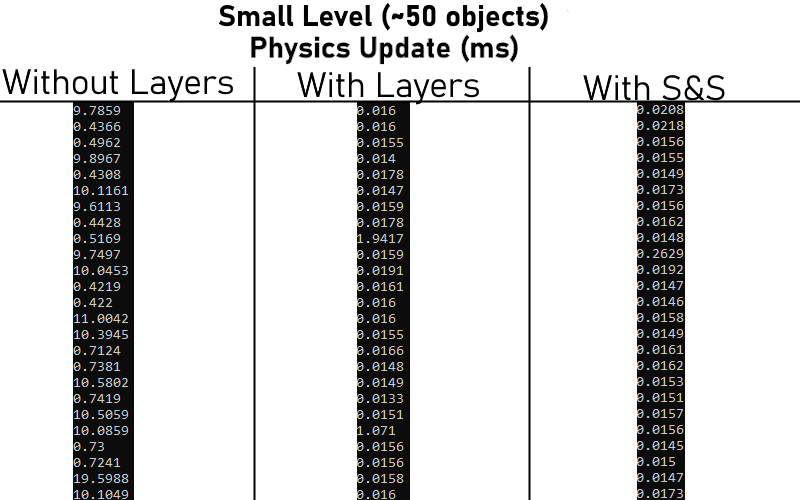
Physics update times on "Codename SF" level.
However, on larger levels, the difference between no broadphase and Sort & Sweep was much more apparent:
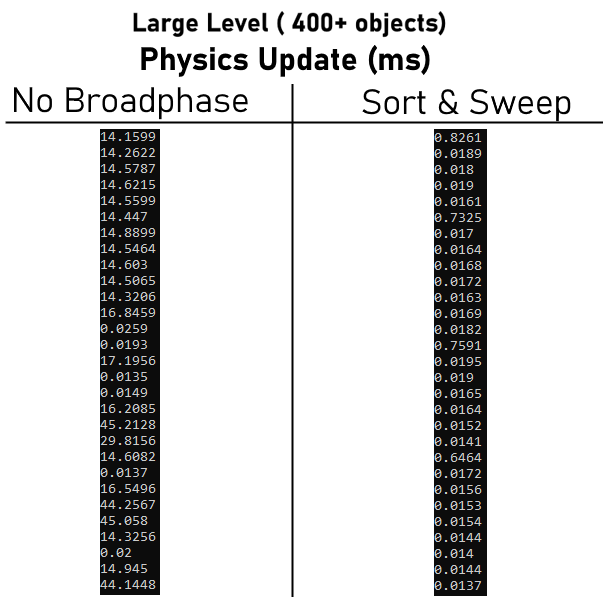
Physics update times on a large level.
I am therefore quite happy with the performance of my Sort & Sweep implementation.
Animation System
Another major contribution to the project was the animation code. I implemented all of the code pertaining to animations, including playing animations, transitioning animations and networking the animations across players. The code to render the animations was mainly taken from the OpenGL tutorial material in CSC8502, with some modifications. Firstly, I modified it to interpolate frames of animation. It does this my passing in the joint data for both the current frame of animation and the next frame of animation, along with a float value between 0 and 1 which represents the progress to the next frame, into the vertex shader. From these values, we can interpolate the animation frames and get smooth animation that does not jump from frame to frame.
Transitions
Next, I wanted to make animations transition, so that when a new one is played it does not immediately snap to the new joint poses. To do this, I reused my interpolation code, but instead of interpolation to the next frame of the same animation, I interpolate between frames from one animation to the next, based on how long the user sets the transition to be. By doing this, joint positions are interpolated between animations and they can be switched much more smoothly.
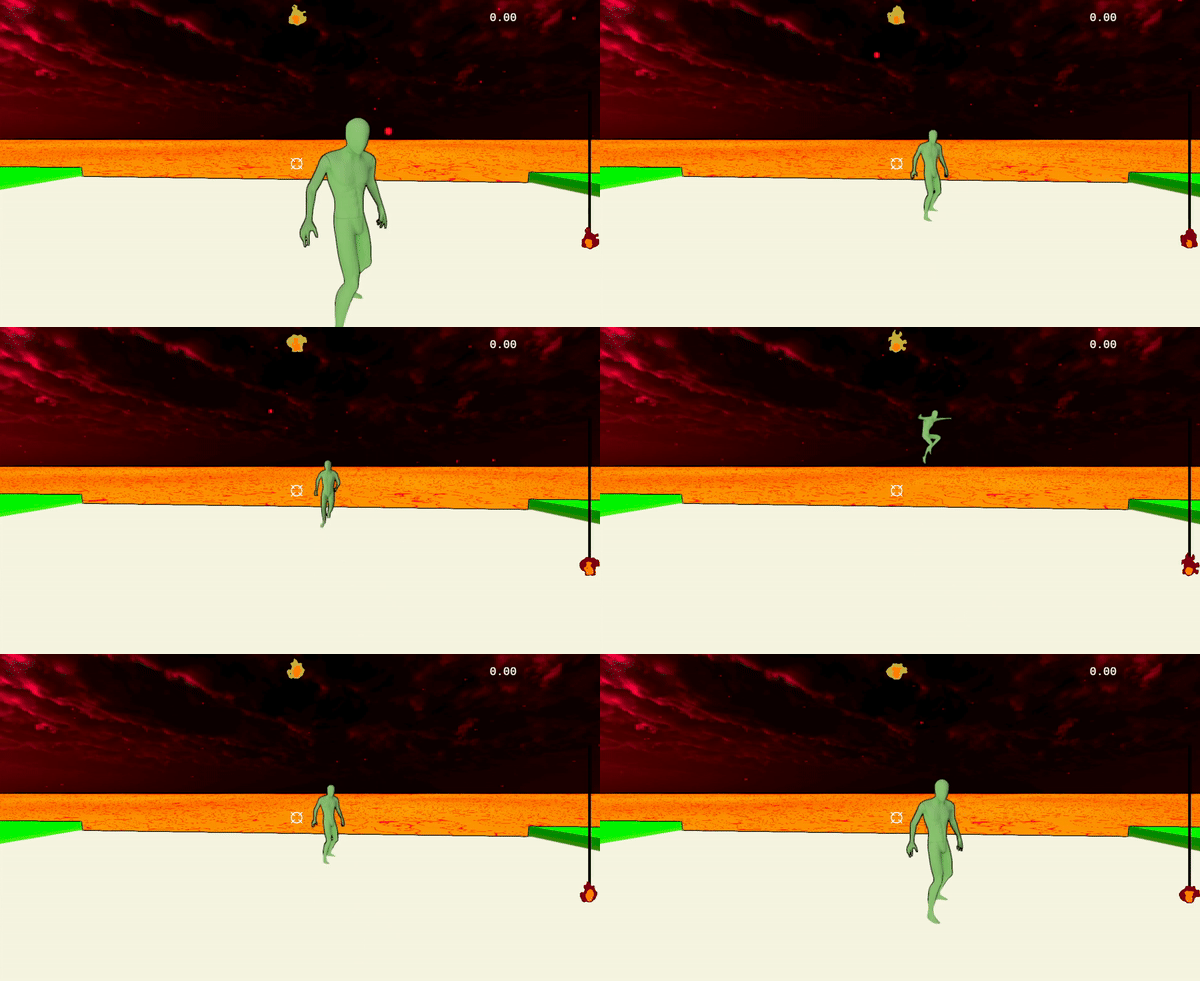
Player's animations transition.
I noticed one problem with this however. Some animation transitions did not look very good, due to drastic differences in joint positions. For example, transitioning directly from the running left animation to the running right animation looked bad. To help alleviate this issue, I added the ability for a transition to use a midpose. This means that a transition can be Animation 1 -> midpose -> Animation 2. By doing this, the swapping of the animation feels more natural. For the project, I had the player’s idle animation as the midpose for every transition, but if I had more animations I could have set this on a per animation pair basis.
Networking Animations
The final step of the animation system was to network the animations. The server will handle the changing of animations and detect what animation a player should be in, and send a message to the clients to tell them to change the animation of a specific object. I did not create the underlying networking system, as that was Joe’s (LINK) work. I did however utilise it by adding a new remote function call from the server to client, Player_Animation_Call:
void GameplayState::ReadNetworkFunctions() {
    //These lines were not created by me
    while (!networkData->incomingFunctions.IsEmpty()) {
        FunctionPacket packet = networkData->incomingFunctions.Pop();
        DataHandler handler(&packet.data);
        switch (packet.functionId) {
            ...
            //These lines were!
            case(Replicated::Player_Animation_Call): {
                Replicated::RemoteAnimationData data = handler.Unpack< Replicated::RemoteAnimationData>();
                UpdatePlayerAnimation(data.networkID, data.state);
            }
            break;
            ...
        }
    }
}
...
void GameplayState::UpdatePlayerAnimation(int networkID, Replicated::PlayerAnimationStates state) {
    GameObject* playerObject = world->GetObjectByNetworkId(networkID);
    if (!playerObject)return;

    AnimatorObject* playerAnimator = playerObject->GetAnimatorObject();
    if (!playerAnimator)return;

    switch (state) {
        case Replicated::IDLE: {
            playerAnimator->TransitionAnimation("Idle", 0.1f);
            break;
        }
        case Replicated::JUMP: {
            playerAnimator->TransitionAnimation("Jump", 0.1f);
            break;
        }
        case Replicated::FALLING: {
            playerAnimator->TransitionAnimation("Fall", 0.1f);
            break;
        }
        case Replicated::RUNNING_FORWARD: {
            playerAnimator->TransitionAnimation("Run", 0.1f);
            break;
        }
        case Replicated::RUNNING_BACK: {
            playerAnimator->TransitionAnimation("RunBack", 0.1f);
            break;
        }
        case Replicated::RUNNING_LEFT: {
            playerAnimator->TransitionAnimationWithMidPose("LeftStrafe", 0.15f);
            break;
        }
        case Replicated::RUNNING_RIGHT: {
            playerAnimator->TransitionAnimationWithMidPose("RightStrafe", 0.15f);
            break;
        }
    }
}
And on the server side:
void RunningState::UpdatePlayerAnimations() {
    for (std::pair<int,GameObject*> playerObject : playerObjects){
        PlayerMovement* playerMovement;
        if (playerObject.second->TryGetComponent<PlayerMovement>(playerMovement)) {
            PlayerMovement::PlayerAnimationCallData data = playerMovement->GetPlayerAnimationCallData();
            if (data.isGrappling || (data.inAir && !data.isFalling)) {
                SetPlayerAnimation(Replicated::JUMP, playerObject.second);
                continue;
            }
            if (data.inAir) {
                SetPlayerAnimation(Replicated::FALLING, playerObject.second);
                continue;
            }
            if (!data.hasInput) {
                SetPlayerAnimation(Replicated::IDLE, playerObject.second);
                continue;
            }
            if (data.backwards) {
                SetPlayerAnimation(Replicated::RUNNING_BACK, playerObject.second);
                continue;
            }
            if (data.strafe ==0) {
                SetPlayerAnimation(Replicated::RUNNING_FORWARD, playerObject.second);
                continue;
            }
            if (data.strafe > 0) {
                SetPlayerAnimation(Replicated::RUNNING_RIGHT, playerObject.second);
                continue;
            }
            else {
                SetPlayerAnimation(Replicated::RUNNING_LEFT, playerObject.second);
                continue;
            }
        }
    }
}
...
void RunningState::SetPlayerAnimation(Replicated::PlayerAnimationStates state, GameObject* object) {
    int id = object->GetNetworkObject()->GetNetworkId();
    if (playerAnimationInfo[id] == state)return; //already in that animation!
    playerAnimationInfo[id] = state;
    SendPlayerAnimationCall(state, object);
}
This system is limited in that it may get complicated with many more extra animations. I decided to it this way however as it lets me decide how to transition each animation, and for how long. I also knew that the number of animations in the game would be quite small (especially since I chose all of them!) so this system was sufficient. In the game, the system worked exactly as I intended it to and helped the other players in the game feel much more real. Overall the animations looked appropriate, and since the game was so fast paced, foot sliding was not really an issue, so I did not need to tweak with the animation speeds much.
Code Rework & Game Flow
Another significant and important task I undertook was handling changes in level. Until I began work on this, all of the code in the project was coded in such a way that a lot of it would only work for the first level, and would break when moving to a new level. For example, the code to load level objects was inside GameplayState’s OnEnter function (which is called when we move from the main menu to the gameplay). We do not transition out of this state when changing levels, so the next level would never be loaded. There were many member variables for classes that were set only when entering the gameplay state.
When deciding how levels transition, I had 2 major choices: do we clear the game world, deleting all objects and then creating new ones for the next level, or do we reuse the objects that we have and change their values, so we do not have to make new ones? I decided to go with the first option, as it was the simpler, albeit less optimal, approach. Using a pooling system for level objects would have been superior, but this would have taken more development time and I didn’t want to risk such an important feature being unfinished.
For level transitions, it was important to establish a new game flow, so that the game starts when all clients have loaded. The new flow looks like this:
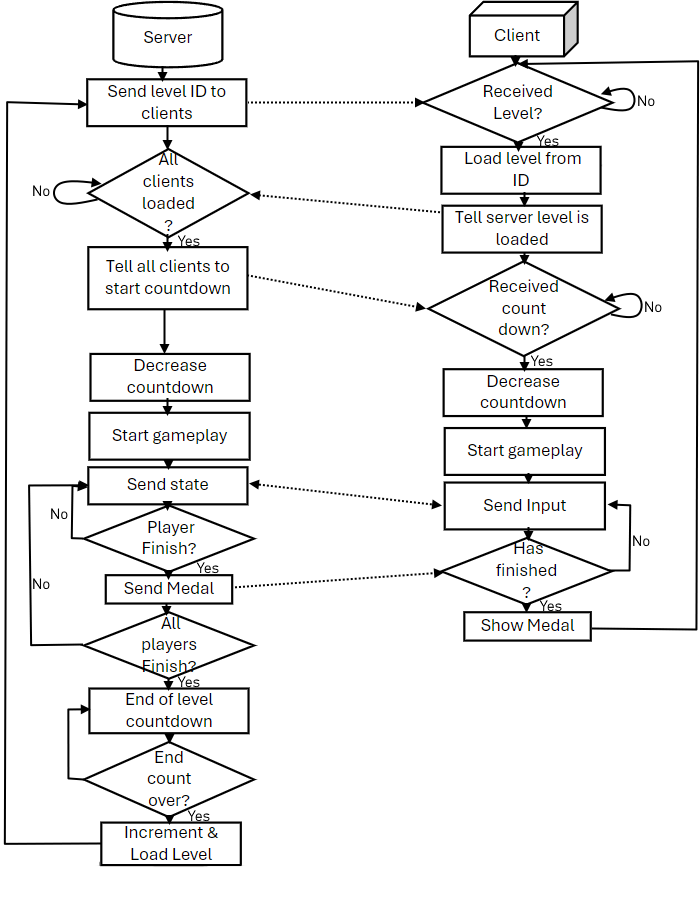
Simplified Flow diagram of the gameplay.
Level Select
When we decided our game was going to be level based, a feature I really wanted to add was a level select, so the players can choose what level they want to play in multiplayer. After reworking the level loading (previous section), I had functions set up to change the level from the client to server, but UI to do so. As such, I investigated Joe’s (link) UI system he had created integrating LUA, and found it relatively easy to understand, such that I felt confident in attempting my level select.
When imagining the level select, I had two ideas in mind for the UI: A thumbnail image showing the level, and the name of the level above it.
Adding the UI involved adding some extra LUA code to the MainMenu.lua file:
...
        {
            color = COLORS.white,
            image = "hellMain/ArrowLeft.png",
            aSize = Vector2:new(70, 70),
            align = {
                AlignTo("top", 157),
                AlignTo("left", 120)
            },
            id = "DecreaseLevel"
        },

        {
            color = COLORS.white,
            image = "hellMain/ArrowRight.png",
            aSize = Vector2:new(70, 70),
            align = {
                AlignTo("top", 157),
                AlignTo("left", 450)
            },
            id = "IncreaseLevel"
        },

        {
            text = {
            text = "Select Level",
            color = COLORS.white,
            size = 0.45,
            },
            align = {
                AlignTo("top", 200),
                AlignTo("left", 210)
            },
            id = "LevelName"
        },

        {
            color = COLORS.white,
            image = "LevelThumbnails/Level 1 - Adam Test.png",
            aSize = Vector2:new(480, 320),
            align = {
                AlignTo("top", 230),
                AlignTo("left", 100)
            },
            id = "LevelThumbnail"
        },
...
Each block represents a different UI element, and their specific values can be changed in C++ code by accessing them using their id variable.
When the client receives the id for a level, these functions are used:
void MenuState::HandleLevelInt(int level) {
    currentClientLevel = level;
    std::string levelName = reader->GetLevelName(level);
    UpdateLevelName(levelName);
    UpdateLevelThumbnail(levelName);
}

void MenuState::UpdateLevelName(std::string levelName) {
    auto& textElement = canvas->GetElementById("LevelName", "lobby");
    auto& textElementData = textElement.GetTextData();
    textElementData.text = levelName;
}

void MenuState::UpdateLevelThumbnail(std::string levelName) {
    auto& imageElement = canvas->GetElementById("LevelThumbnail", "lobby");
    imageElement.SetTexture(levelThumbnails[levelName]);
}
Which will update the name and thumbnail image of the level being show, as below.
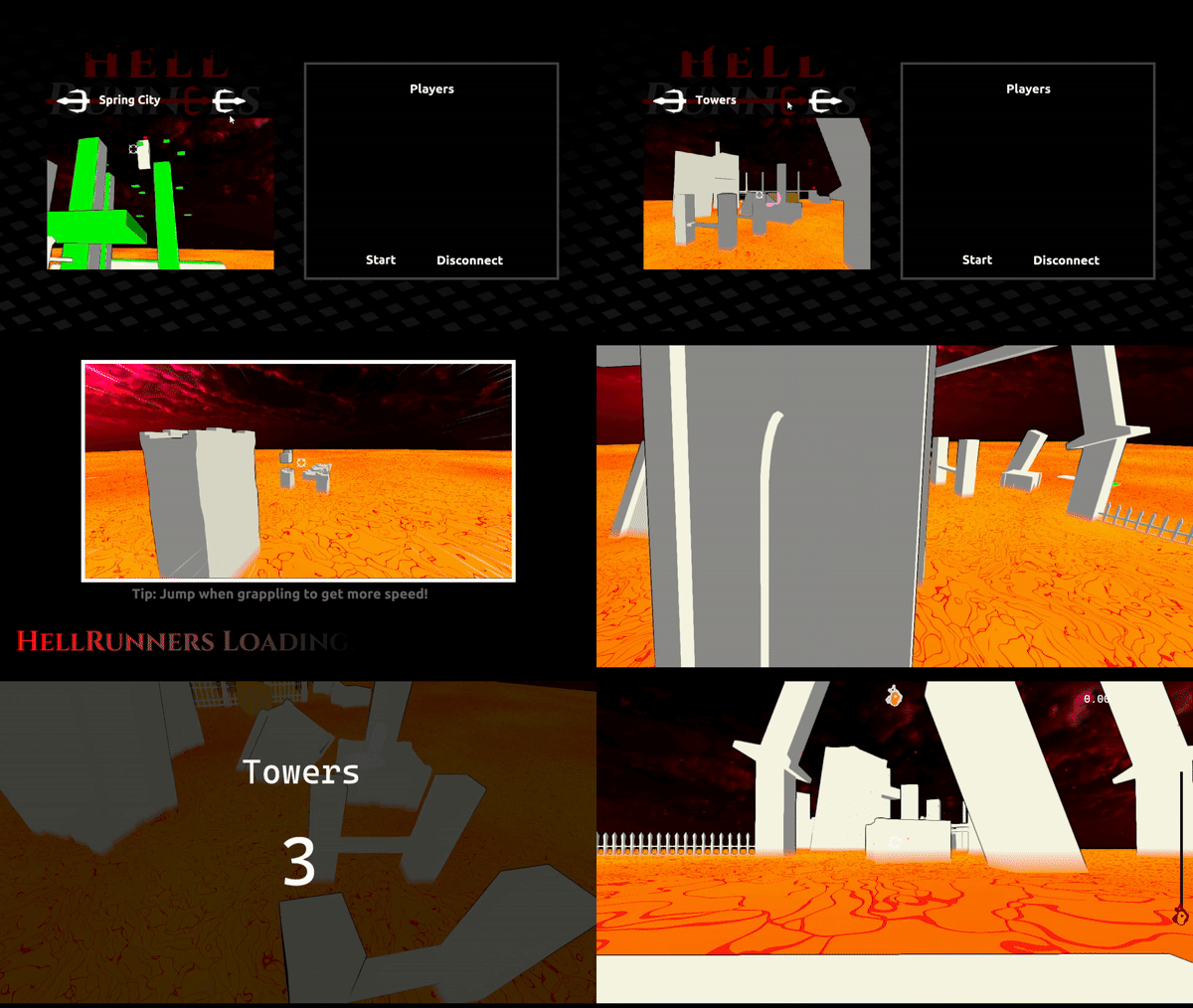
Level can be selected from the lobby.
Moving platforms
The game’s levels felt very static, as there was not many moving parts to the levels. I decided to add moving platforms and spikes to the game. For this, I made a general component to move objects between two points over time, which was coded such that both moving platforms and spikes use the exact same component:
class ObjectOscillator : public Component {
    ...
    private:
    ...
    PhysicsObject* phys;
    Vector3 initPosition;

    Vector3 normalisedDirection;
    float distance = 1.0f;
    float waitDelay = 0.0f;
    float cooldown = 0.0f;
    bool isReturning = false;
    float timer = 0.0f;
    float frequency = 1.0f;
    State state = RUNNING;
    ...
}
I gave the component 2 extra values for this, a waitDelay and a cooldown. WaitDelay is used to pause the platform halfway through the oscilation (for example, spikes staying up for a few seconds) and cooldown is used at the end of the oscillation (for example, a moving platform staying in place for a few seconds after returning). This allowed me to customise the way the objects moved in further detail. To move the objects over time, I used these lines:
float cosTimer = (-1.0f * cos((timer * frequency * TAU)) + 1) * 0.5f; //this gets a value from 0 to 1 where 0 is the initial value
gameObject->GetTransform().SetPosition(initPosition + normalisedDirection * cosTimer * distance);
The first line takes the timer (how long an object has oscilated for) and the frequency, and returns a value between 0 and 1 based on how far away the object should be from its initial position. From there, we use this value to set the position of the object.
Riding platforms
Moving platforms are useless without the ability to stand on them. In our engine, we did not have the capability to parent objects to other objects, so we could not just “attach” the player to the platform. Instead, I added code to the oscillator script to make it move any players that are on the platform when the platform moves.
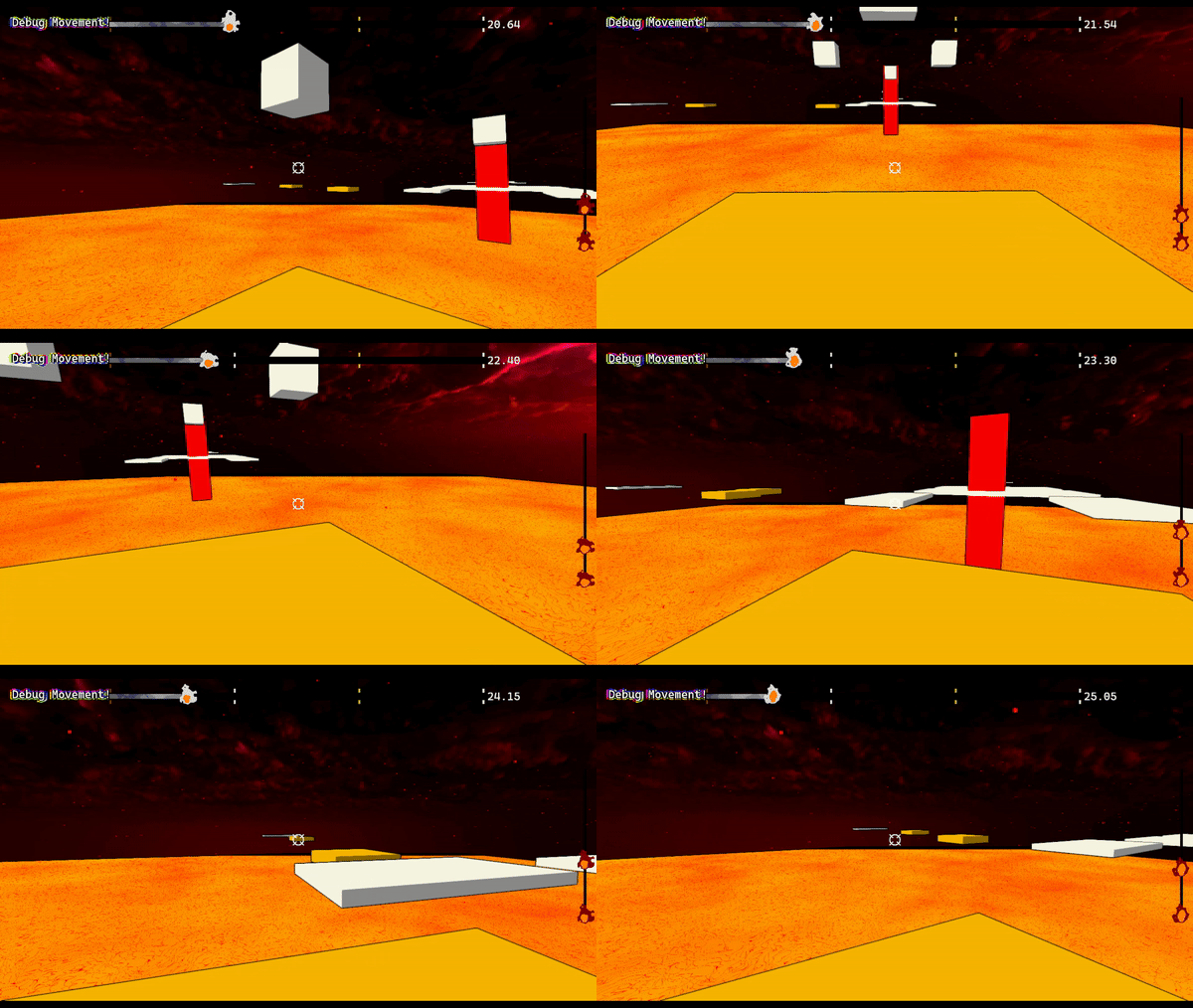
Players can stand on moving platforms.
I wasn’t done yet however. I wanted to convey a feeling of momentum when on the platform, such that then the player leaves, they retain the velocity they had when standing on the platform. To do this, I set the velocity of the platform’s physics object when it moves:
void ObjectOscillator::UpdateOscillation(float dt) {
    ...
    Vector3 changeInPosition = (gameObject->GetTransform().GetPosition() - lastPos);
    lastVelocity = changeInPosition / dt;
    phys->SetLinearVelocity(lastVelocity); //do this so they can push things around!

    for (std::pair<GameObject*, bool> pair : objectsOnPlatform) {
        if (pair.second) {
            Transform* t = pair.first->GetTransformPointer();
            t->SetPosition(t->GetPosition() + changeInPosition);
        }
    }
}
Then, when a player leaves the platform, we apply an impulse equal to the velocity of the platform:
void ObjectOscillator::OnCollisionEnd(GameObject* other) {
    if (other->GetTag() == PLAYER) {
        objectsOnPlatform[other] = false;
        other->GetPhysicsObject()->ApplyLinearImpulse(lastVelocity);
    }
}
Surely by setting the velocity of the physics object, the platform will move in unintended ways when we integrate it’s velocity? The solution to this was to ignore moving platforms when integrating velocity, along with any other objects that do not need it, such as the static ground blocks.
Grappling platforms
A big flaw in the game to this point was that the grappling hook could not attach to moving objects: once the grapple point had been set, it would not change. This was not acceptable when I added platforms, as it felt very unsatisfying to grapple a moving platform, only for the hook to remain still. I decided to fix this my altering the grappling hook itsself instead of the moving platforms. The hook will now update the point to apply force towards whenever the object that was grappled changes position.
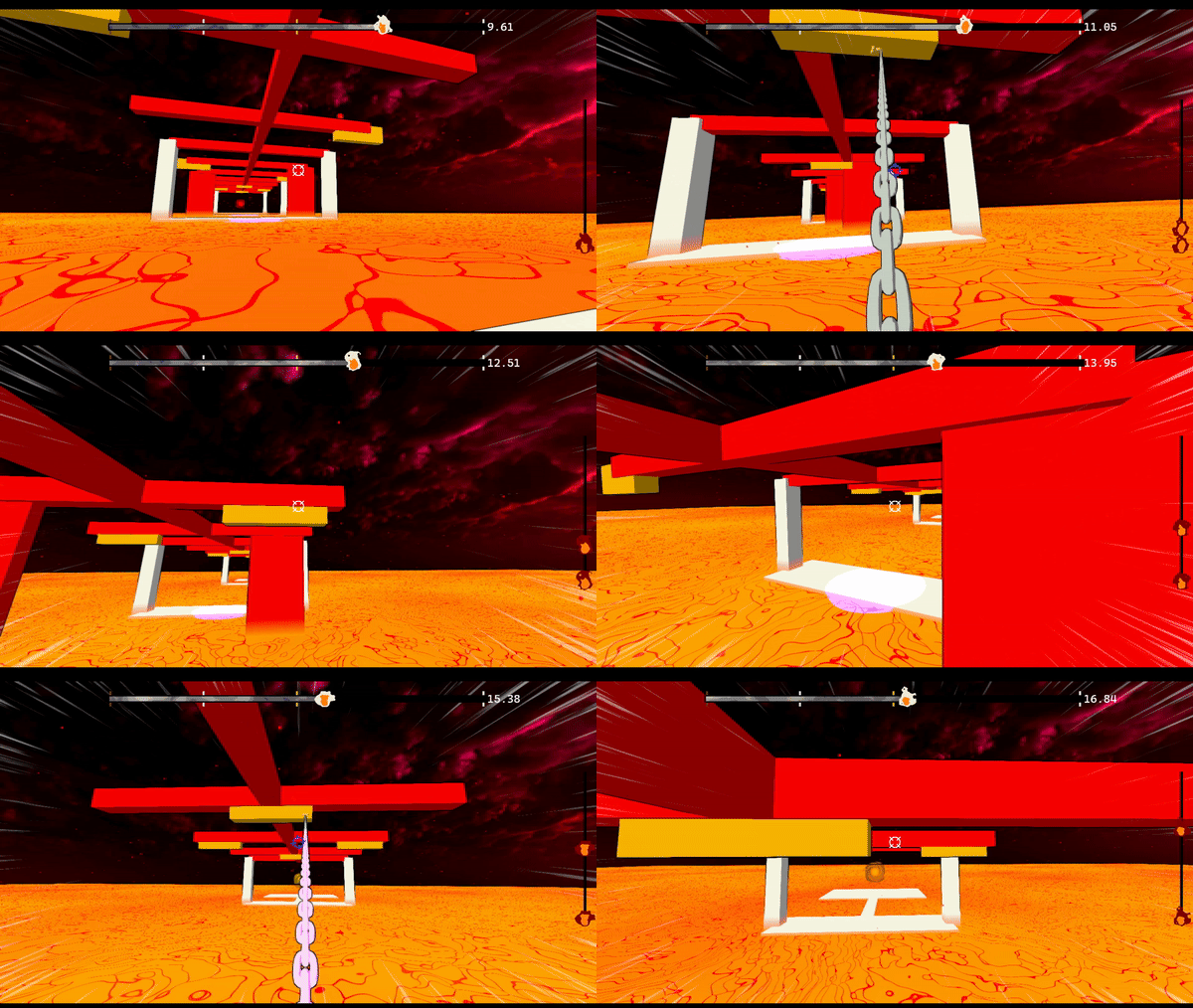
The player grapples the moving objects to swing through the level.
Unity Tools
For the project, we decided to use the Unity editor as a level creation tool: we build the level in Unity, placing blocks and objects, then export the level to JSON which will be read by the C++ game. I was not responsible for the initial creation of the JSON exporter code, as this was mostly done by Idhant (click for link). I did however expand upon it, adding extra types of game objects and level information, such as moving platforms and medal values specific to each level. When adding moving platforms in the editor and setting their values, it was hard to imagine how the platform would actually move in the game. I therefore decided to add a visualiser tool to the editor which would show how the platform will move, so the user can tweak and adjust the platforms without having to export the level and load it into the game.
To do this, I utilised Unity’s editor gizmo tools to draw the mesh of the object in a transparent form, that will move as it would in the game:
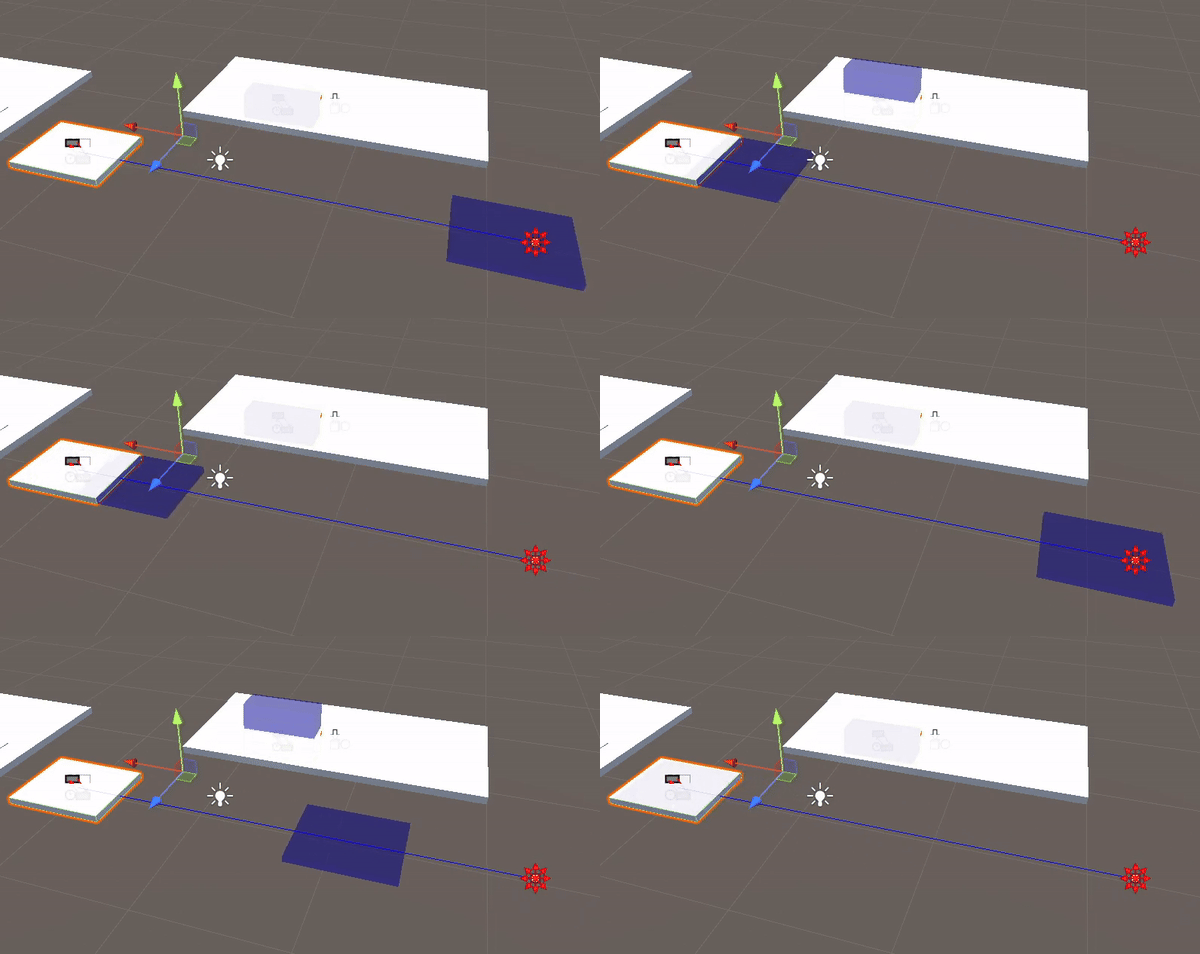
Moving platform and spike visualiser in Unity. These both use the same code to move in the game.
The code to move the platform over time in Unity is the exact same as the C++ code, albeit with some language function translations. The platform visualisations therefore behave exactly as they would in the actual game.
What went well
I am quite happy with the final result overall, as it was more polished than I was expecting, and it was also genuinely fun to play in multiplayer, even though the gameplay was simplistic. Since we kept the scope of the game low throught the project, we managed to hit nearly all our feature targets.
I am especially happy that I managed to add in the level select, as this was a feature I really wanted when we decided on a level based game. One of the most satisfying moments in the project was the animation system’s networking. After getting the transitions to function, I started to add the code to network it all. However, the only way to test if it worked was after all of it was programmed. Once I had finished coding the networking for it, I ran the game and it worked exactly as I hoped it would, without any issues, and I felt quite proud.
What I would improve
My main regret from the project was not having a chance to do any development with the PS5 Devkits, as our team did not attempt to port the game to PS5. There were a few reasons for this, primarily time constraints. We decided as a team that we would prefer a more polished, finished game that only works on PC rather than a less polished one that may or may not even work on PS5. Making the game work on the PS5 would have taken a long time, as all of the rendering code would have had to be changed, and we did not have a dedicated graphics programmer on our team to figure it out.
Some parts of the game were not fully complete and functional: the players were supposed to play a victory animation once reaching the end, but this had a bug and did not always play. I unfortunately did not have enough time to fix this bug. I added functionality to the menu exit button, but this did not get PRd in time for the final submission (!). Additionally, the menu funcionality could have been smoother, as once you had entered gameplay, there was no way to return to the menu without closing and reopening the game.